

Most interior designers lose approval speed because their presentations fail to guide clients through the design logic in the right order. A strong template for interior design presentation gives every project a repeatable structure from summary to final sign-off. It also helps the designer control the story.
A deck that gets approved quickly usually follows a sequence clients can understand without extra explanation. They need to see the concept, layout, material logic, budget impact, timeline, and next steps in a single clear flow. If that order breaks, revisions begin before decisions mature.
My take is that a presentation deck should never exist solely for polish. It is a decision tool that protects the designer’s thinking and gives clients confidence before procurement begins. The stronger the deck’s structure, the easier it becomes to move from interest to approval.

What Every Interior Design Presentation Template Should Include
A useful presentation template for interior design typically includes 10 to 14 structured slides, each serving a single clear purpose. I’d recommend treating these sections as a table of contents for every client-facing deck.
- Cover Slide: Add studio branding, project name, client name, date, version number, and contact information. This helps clients identify the right deck and prevents confusion when old PDFs keep circulating.
- Project Overview: Summarize scope, rooms covered, project address, key deliverables, and main design goals. This slide reminds clients what the deck covers before they start reacting to visuals.
- Design Direction: Explain the conceptual narrative before any mood boards or renderings appear. This gives the client a reason to understand the design instead of judging isolated colors too early.
- Mood Board: Use curated references showing aesthetic language, palette direction, textures, and material sensibility. Good mood boards help clients understand feeling before they review products.
- Color Palette and Materials: Show named colors, finish swatches, fabric samples, hardware references, and flooring direction. The slide should connect visual preference with practical material decisions.
- Floor Plans: Include 2D layouts showing furniture placement, circulation paths, and zone logic at accurate scale. This is where Foyr’s floor plan creator helps turn clients’ ideas into clear layouts.
- 3D Renders: Add photorealistic views showing rooms at eye level with finishes, lighting, and furniture scale. Foyr Neo supports photorealistic visuals without requiring high-end hardware.
- Furniture and FF&E Selections: Present product images, supplier names, dimensions, unit pricing, and availability notes. This slide connects client approvals with the purchasing decisions that follow.
- Lighting Plan: Show fixture locations, layer logic, switching ideas, and control zones for each room. Lighting belongs in the deck because it shapes both atmosphere and daily use.
- Budget Summary: Include design fees, product costs, contractor scope, contingency, and exclusions. The budget slide should clarify investment without reducing the design to numbers.
- Project Timeline: Show approval dates, procurement milestones, installation stages, styling windows, and expected handover. A clear timeline prevents clients from assuming design approval means immediate installation.
- Approval and Next Steps: End with sign-off details, pending questions, payment milestone, and next meeting date. This slide turns a good presentation into a controlled decision moment.
“If you are organized during your presentation, you are exhibiting the way their project will be managed.”
Victoria Sanchez, Principal Designer, Victoria at Home (Source)
The Slide Sequence For Faster Client Approvals
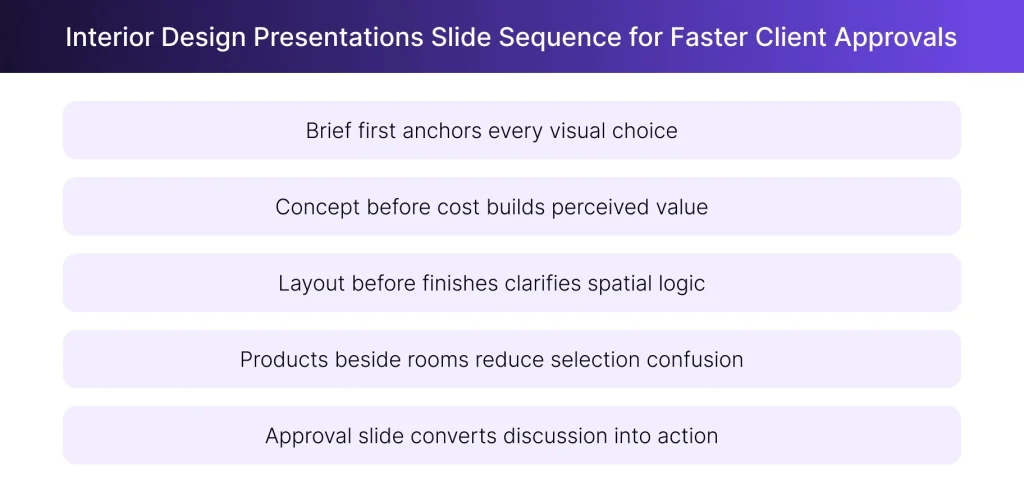
Clients approve faster when information follows the same order they naturally use for understanding value and risk. Slide order matters more than slide design because clients reject pricing quickly when the concept is underexplained. A template for interior design presentation should build confidence before asking clients to approve cost, procurement, or timeline.
- Start with the brief: Open with goals, pain points, lifestyle needs, scope, and decision boundaries. This prevents clients from treating the deck like an interior design portfolio and judging visuals without context.
- Show the concept before the cost: Present the design direction, mood board, and spatial logic before discussing investment. Clients usually respond better when they understand why a decision matters before seeing its price.
- Move from layout to materials: Show floor plans before finish selections because circulation and furniture scale should lead surface decisions. I’d recommend using Foyr’s 2D floor plan to 3D model workflow when layouts need fast visual translation.
- Connect products to rooms: Present FF&E selections beside the rooms where those items appear. This keeps products grounded in use, scale, and purpose instead of making them feel like shopping screenshots.
- End with approval clarity: Close with approved decisions, pending questions, payment triggers, and next steps. A strong sign-off slide reduces the email trail that often follows a vague presentation meeting.
Client Questions to Answer Before Creating the Presentation
The strongest decks come from confirmed client answers because assumptions turn presentations into correction meetings rather than approval meetings. Before building a template for interior design presentation, I’d confirm the questions below during intake or discovery.
These answers shape the deck’s narrative, visuals, budget structure, and approval sequence.
| S. No. | Question | Rationale |
| 1 | What do you love and dislike about your current space? | Shows what to preserve and what must change |
| 2 | Who uses the home, and do pets or special needs matter? | Connects design decisions with real daily routines |
| 3 | What is the primary function of each room? | Prevents visual choices from ignoring practical use |
| 4 | Which furniture, artwork, or personal pieces must remain? | Protects sentimental pieces and layout constraints |
| 5 | Which design styles, colours, and materials do you prefer? | Gives mood boards a clear visual starting point |
| 6 | Which colours, materials, or details do you dislike? | Prevents avoidable revisions after the first review |
| 7 | Are you open to structural or lighting layout changes? | Defines whether the deck shows cosmetic or deeper options |
| 8 | What is your target investment for this project? | Keeps FF&E selections aligned with budget comfort |
| 9 | What is your timeframe, move-in date, or event deadline? | Helps the timeline slide reflect real urgency |
| 10 | How involved do you want to be in execution? | Sets expectations for approvals and purchasing decisions |
Designers can collect these answers through a structured intake workflow before creating the deck. If responses later need a project record, Foyr’s client questionnaire guide can support a cleaner discovery process.
Presentation Mistakes That Delay Interior Design Approvals
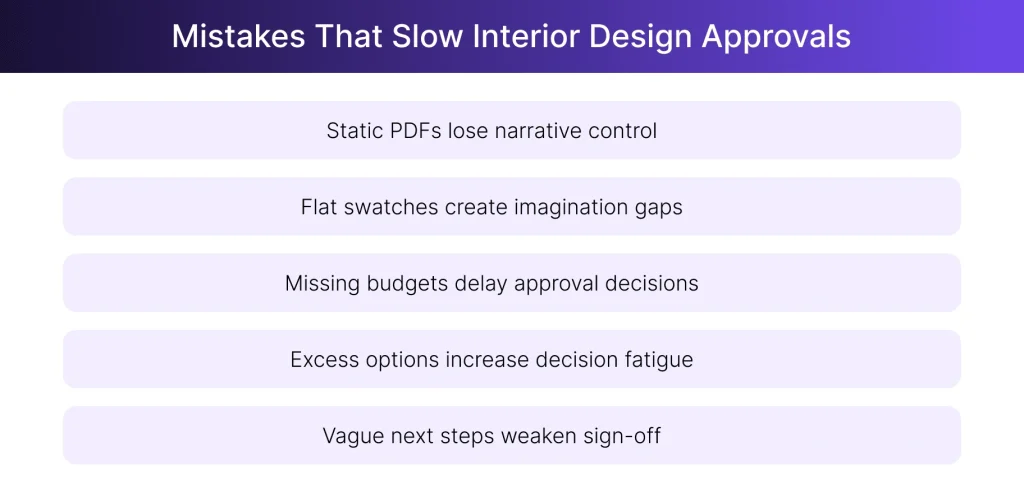
Approval delays usually occur when clients must imagine outcomes, compare excessive options, or approve decisions without sufficient context. I’ve seen beautiful decks fail because they made the client work too hard. A good template for interior design presentation should eliminate confusion and preserve the designer’s narrative pace.
- Sending a PDF without a walkthrough: A static PDF removes the designer’s control over pacing and interpretation. I’d recommend a live walkthrough for first presentations, especially when layout, budget, and materials need guided explanation.
- Using inconsistent branding across slides: Inconsistent fonts, spacing, headers, and placeholders weaken client confidence before the design is reviewed. Keep the default format clean, then use restrained branding that supports the work.
- Showing materials as flat swatches: Flat swatches prompt clients to imagine the relationships among color, texture, lighting, and scale. Applied Foyr Neo renderings help clients evaluate materials inside the room, not outside it.
- Omitting the budget from the deck: Removing budget from the presentation moves the hardest conversation into a second meeting. My take is that budget belongs after the concept, not outside the deck.
- Including too many options per room: Excess options create decision fatigue when the designer needs one clear approval. I’d show one primary direction, then support it with measured alternates.
Free Interior Design Presentation Approval Template
A downloadable template should reduce deck preparation time while helping clients review design, budget, timeline, and approvals together.
This free deck structure works for PowerPoint, Google Slides, or PDF exports, depending on your studio’s process. It is more useful than many free PowerPoint presentation templates for interior designing as it has been built around client approvals, not decorative layouts.
| Slide | Section | What It Should Include |
| 1 | Cover Slide | Studio logo, project name, client name, date, version number |
| 2 | Project Brief Summary | Scope, rooms included, client goals, key constraints |
| 3 | Client Preference Snapshot | Lifestyle needs, style direction, disliked elements, budget comfort |
| 4 | Design Concept | Core design idea, mood direction, overall look, guiding principle |
| 5 | Mood Board | Inspiration images, colours, textures, furniture references |
| 6 | Floor Plan | Layout, circulation, furniture placement, room zones |
| 7 | 3D Views | Rendered room views, walkthrough screenshots, key angles |
| 8 | Material Palette | Flooring, wall finishes, fabrics, hardware, lighting references |
| 9 | FF&E Selections | Furniture, fixtures, decor, vendor names, dimensions, unit costs |
| 10 | Budget Summary | Design fees, product costs, contractor scope, contingency notes |
| 11 | Project Timeline | Design approval, procurement, site work, installation, styling |
| 12 | Approval Tracker | Approved items, pending questions, client comments, revision notes |
| 13 | Next Steps | Payment milestone, procurement trigger, site coordination, meeting date |
| 14 | Sign-Off Slide | Client name, approval date, designer name, signature field |
Use this interior design presentation approval template to organize your client brief, visuals, floor plans, 3D renders, budget notes, project timeline, approval tracker, and sign-off details in one structured deck.

Create Presentation Visuals With Foyr Neo and Manage Approvals With Foyr Manage
The presentation deck is a visual approval tool first, and the project workflow begins only after clients approve the design direction.
Foyr Neo handles the design and visualization layer, while Foyr Manage supports the workflow after sign-off. Foyr Neo creates floor plans, mood boards, 3D views, walkthroughs, and photorealistic renders that populate the deck and help clients approve the design direction.
- Floor Plans for Layout Slides: Use Foyr Neo to create 2D floor plans that show furniture placement and circulation. These visuals support the layout slide and help clients approve spatial decisions before furniture selections begin.
- 3D Renders for Room View Slides: Create photorealistic renders in Foyr Neo to show the room at eye level. Clients can review scale, finishes, lighting, and furniture before the design moves forward.
- Moodboard and Material Direction: Use Foyr Neo visuals to support mood boards, material palettes, furniture direction, and finish combinations. This keeps the design story visual, specific, and easier to compare against the brief.
- Walkthroughs for Live Presentations: Use walkthroughs when clients need help understanding room sequence, sightlines, and spatial flow. A guided 3D walkthrough gives the designer control over pace and keeps client feedback focused.
- Foyr Manage for Post-Approval Workflow: Once the client approves the deck, Foyr Manage becomes the execution layer. Designers can store approvals, create tasks, convert selections into estimates or invoices, and keep next steps connected to the project record.
The clean workflow is simple for design studios. Create presentation-ready floor plans, 3D renders, moodboard visuals, and walkthroughs with Foyr Neo. Then use Foyr Manage to keep approvals, estimates, invoices, and next steps organized after the client signs off.
Try Foyr Neo free for 14 days and create client-ready visuals before your next presentation.
FAQs
How many slides should an interior design presentation template include?
A strong template for interior design presentation usually includes 10 to 14 slides. Smaller projects may need fewer slides when the scope is limited to one room. Larger renovations need space for floor plans, mood boards, renderings, FF&E selections, budget notes, timelines, and sign-off details.
Should the budget appear in the design presentation or separately?
The budget should appear inside the design presentation after the client understands the concept and spatial logic. Separating budget from visuals often creates a second approval meeting and slows decisions. The honest answer is that clients need to see how design choices connect with investment.
What file format works best for sending interior design presentations to clients?
PDF works best for final sharing because formatting stays stable across devices and email platforms. PowerPoint and Google Slides work better when the designer expects live editing or internal review. I’d recommend presenting live first, then sending a locked PDF after the meeting.
How do you present multiple design options without creating decision fatigue?
Show one primary recommendation, then present limited alternates only where the client must choose. Too many options make the designer look undecided and push clients into comparison mode. A good presentation template should make the preferred direction feel considered, supported, and ready for approval.
Can AI tools generate interior design presentations automatically?
AI tools can help generate early concepts, slide structure, visual references, and text placeholders for presentation decks. Designers still need to review layout logic, materials, pricing, and client fit before presenting. Foyr Neo can create presentation visuals, while Foyr Manage can organize approvals after sign-off.