Foyr Logo

Office Design Software and Planner

Plan and design your office space with an easy office layout planner. Create efficient floor plans, explore office interior design ideas, and visualize your workspace in realistic 2D and 3D with no CAD skills required.

Why 16,237+ Interior Designers Love Using Foyr Neo

Saves Hours of Design Time

Bring your visions and concepts to life in hours — not days or weeks. Foyr Neo combines intuitive design tools and smart machine learning so you get to spend more time designing, and less time tinkering with light and shadows.

Zero Learning Curve

Using Foyr Neo is as easy as 1, 2, 3. First, upload a floor plan or create one from scratch. Then drag and drop from over 60K 3D models to fill your rooms. Lastly, just set the shot and let the AI create stunning 4K renders for you in less than 10 minutes.

Lightweight, Fast & Professional

No need to download anything, Foyr Neo is a web-based office design software that runs at the speed of the Internet. Allowing you to create impressive designs, wow more clients, and win more projects without overloading your hard drive.

What is Office Design Software?

Office design software is a digital tool that helps you create, plan, and visualize office spaces before construction or renovation. It allows you to design layouts, arrange furniture, and experiment with office interior design ideas in both 2D and 3D.

With an office space design tool, you can see how your workspace will look and function, helping you make better decisions before execution. Modern office design software also includes templates, drag-and-drop tools, and realistic rendering for accurate visualization.

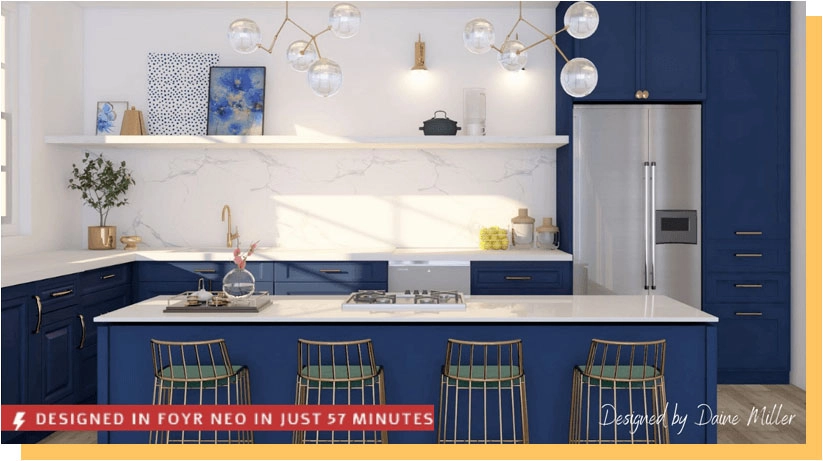
Designed in Foyr Neo in just 57 minutes

“This would have taken me weeks in other programs!”

Start Designing Now With Foyr Neo

And see how easy it is to bring your creative visions to life in this home design software

Why is Foyr Neo the Best Office Design Software?

Easy to Use

Try out the free version for 14 days to see foryourself– right from your web browser

How to Get Started with Foyr Neo

Here’s how Foyr Neo makes designing a office as simple as 1,2,3

Create Office Floor Plans Faster

Stop worrying about 3D models – access 60,000+ ready-to-use products.

Drag-n-drop or customize to use in your office design.

Need a unique item? Import your models or build from scratch.

Get 4K renders in minutes

Stop worrying about 3D models – access 60,000+ ready-to-use products.

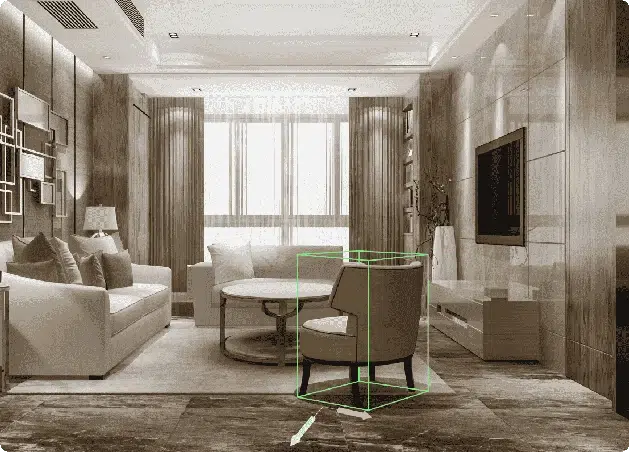
Set the shot, select a preset and let AI take care of lighting, shadows and more

Work on another design while the previous design renders

Office Design Ideas You Can Create

Explore different office design styles using your planner to build a workspace that fits your needs and work culture:

  • Modern open office layouts designed for collaboration, flexibility, and better space utilization
  • Small home office setups that maximize productivity in compact spaces with smart furniture placement
  • Collaborative workspace designs that encourage teamwork with open seating and shared zones
  • Executive office interiors focused on comfort, privacy, and a premium professional look
  • Creative studio office spaces built to inspire innovation with flexible layouts and dynamic design elements

Benefits of Using an Office Layout Planner

An office layout planner helps you design efficient, functional, and visually accurate workspace layouts without complex tools or professional expertise. It simplifies decision-making and improves the overall quality of office design.

  • Easy drag-and-drop interface that lets you quickly place furniture, walls, and office elements without technical skills or CAD knowledge
  • Fast office space planning that helps you create and modify layouts in minutes instead of spending hours on manual drawings
  • Realistic 2D and 3D visualization to preview how your office will look and function before implementation
  • Better space optimization by helping you utilize every area efficiently, improving movement flow and productivity
  • Suitable for beginners and professionals, making it accessible for homeowners, designers, architects, and business teams alike

Start Designing Now With Foyr Neo

Get your concepts out of your head and off your sketchpad and start designing them right now

Frequently asked questions

Using office design software helps you design smarter and faster without manual drawing or complex tools.

  • Plan office layouts with accuracy
  • Visualize office interiors in 3D
  • Reduce design errors before execution
  • Improve space utilization and workflow
  • Save time compared to traditional design methods

Yes, you can use FOYR office layout planner to create floor plans, arrange furniture, and visualize your office space without installing any software.

No, modern office design software is built for beginners. You can design office spaces using simple drag-and-drop tools without any CAD or technical knowledge.

Yes, office design software can be used to create both home office setups and large corporate office spaces, including meeting rooms, cabins, and collaborative areas.

Yes, most office design tools allow you to switch between 2D and 3D views so you can visualize the final office interior design realistically.

Office design software focuses on full interior design and visualization, while an office layout planner is mainly used for arranging spaces, furniture placement, and floor planning.

Yes, businesses use office design software to plan efficient workspaces, improve productivity, and optimize space usage before renovation or construction.

Yes, most tools allow you to export your office design as images, PDFs, or shareable files to collaborate with clients, contractors, or team members.